- Practically AI
- Posts
- 🧠 Smarter Maps, AI Playgrounds, and Tools That Save You Time
🧠 Smarter Maps, AI Playgrounds, and Tools That Save You Time
Today in AI: Navigation gets context, motion design gets simpler, and virtual worlds become playable.
👋 Happy Friday Everyone,
Some frustrations are tiny but universal. GPS routes that still confuse you. Creative work that eats your afternoon. A haircut decision you wish you could preview first.
The tools today are trying to close that gap between instructions and reality, making things behave a little more like a helpful guide than a rigid system.
Keep reading.
🔥🔥🔥 Three big updates
If you’ve ever wished you could just describe a game environment and step inside it, Google is experimenting with exactly that. Project Genie is a prototype that lets you create and explore virtual worlds using text and visual prompts.
You design a character and environment, adjust an image preview, and Genie generates a world that updates in real time as you move. You can remix other worlds or explore a gallery of creations. It’s less like watching content and more like walking inside something you prompted.
Instead of generating a static image or video, the system simulates an environment that reacts to you. That has implications for gaming, training, education, and creative storytelling.
Project Genie is rolling out to Google AI Ultra subscribers in the U.S. (18+).
InVideo partnered with Anthropic to launch AI Motion Graphics that turns a single prompt into professional motion design. You describe what you want, and it generates professional motion visuals from a single prompt. No After Effects. No code. No pre-built template hunting.
The big shift here is cost and access. Motion design used to require specialists and expensive tooling. Now, small teams and solo creators can produce visuals that previously needed an agency pipeline. It compresses production time without lowering visual ambition.
For creators, marketers, and indie studios, this compresses weeks of work into minutes. It’s not replacing designers, but it’s raising the baseline of what one person can produce.

If you use Google Maps a lot, you’ve probably had moments where it technically gave the right directions but still left you confused. Google is adding Gemini to Maps to fix exactly that gap.
Gemini makes navigation more conversational and context-aware. Instead of only drawing routes, Maps can now understand landmarks, surroundings, and intent while you’re moving — whether you’re walking, biking, or navigating a busy area. That means Google Maps stops simply giving passive directions and starts acting more like a real-time guide.
🔥🔥 Two Tools Worth Trying
ANGLES v2 gives you full 360° camera control with a redesigned interface that feels more like moving a real camera than dragging sliders. You can shoot from any perspective and manage projects more cleanly.
It’s ideal for creators who want cinematic control without learning complex animation tools. Think of it as camera choreography made approachable.
2. Happycapy
Happycapy is a browser-based AI computer that runs Claude Code inside a private sandbox. You get a visual interface that shows what the agent is doing and what it produces.
It’s best for people who want to experiment with AI workflows or coding without setting up heavy infrastructure. You open a tab, and you’re running an AI workstation.
🔥🔥 1 Cool Thing You Can Do Today With AI
Preview your next haircut before you visit the salon
This workflow analyzes your face and hair, recommends styles, and generates realistic haircut previews directly on your photo. It’s basically a fitting room for your head.
Prompt: Male Haircut Analysis + Image Generation Prompt (Nano Banana Pro Optimized)
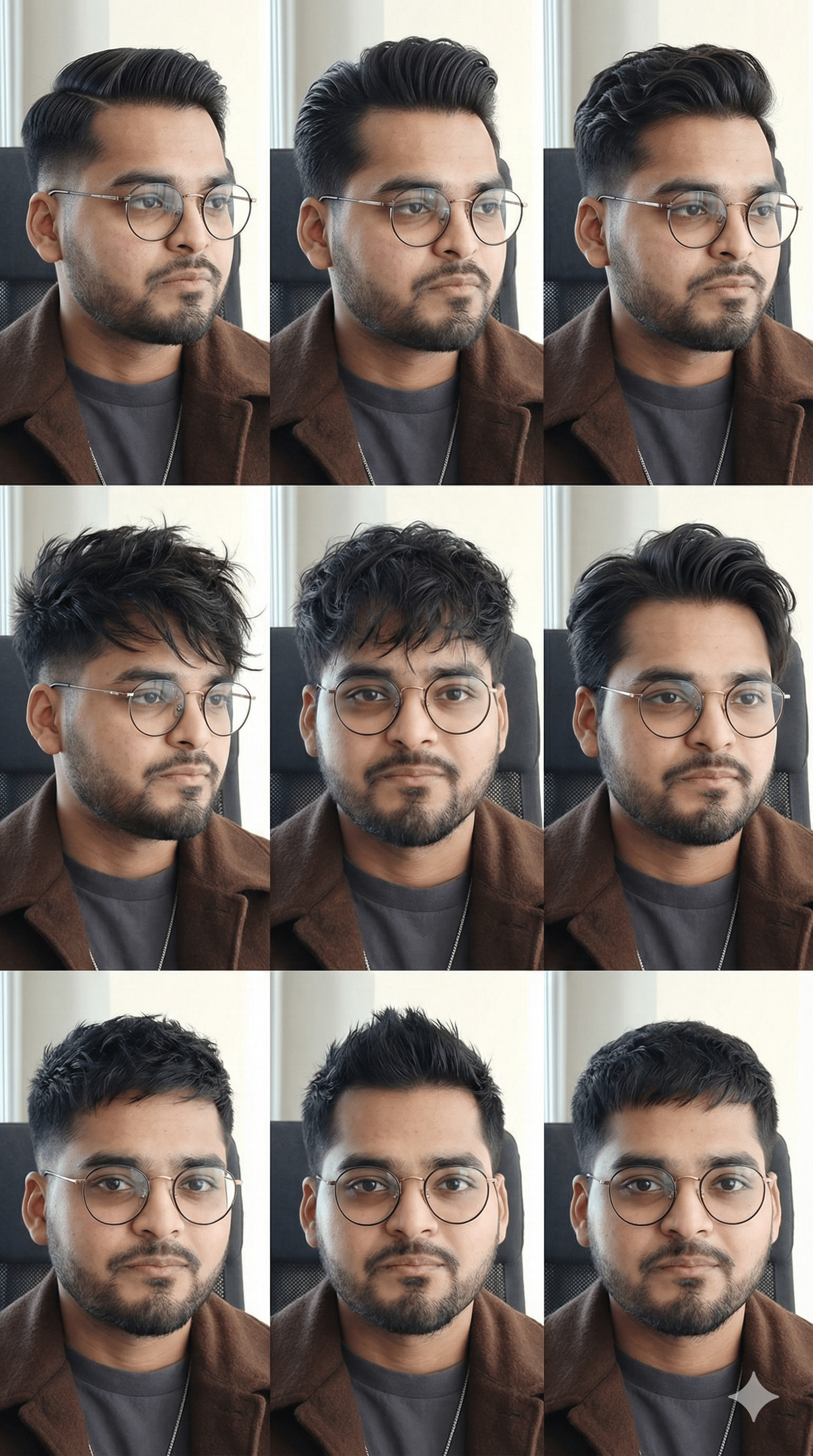
Analyze the single image I uploaded. Identify my exact face shape and hair type with precision. Then, generate a vertical 9:16 4K 3x3 grid of hairstyle reference images directly on my face.
Requirements:
Analyze the uploaded image to detect:
• Face shape
• Hair density, texture, curl pattern, and growth direction
Based on this analysis, recommend haircuts for three scenarios:
• Professional or workplace
• University or college
• School or teenage
Provide 4 haircut options per scenario, each with a short, specific explanation of why it suits my geometry and hair behavior. After the recommendations, generate a 3x3 grid of haircut images, each placed realistically on my face.
Technical requirements:
• Vertical 9:16 orientation
• 4K quality
• Realistic lighting
• Natural hair flow and believable texture
• No fantasy looks or exaggerated AI styling
Variation rules for the 3x3 grid:
• Mix short, medium, and slightly longer styles
• Reflect the recommended haircuts
• Maintain consistency with my real hair type and proportions
Output must be structured, clean, and easy to compare across scenarios.
Your goal is accuracy, realism, and professional grooming quality.
Female Prompt: Female Haircut Analysis + Image Generation Prompt (Nano Banana Pro Optimized)

Analyze the single image I uploaded. Identify my face shape and hair type with high precision. Then, generate a vertical 9:16 4K 3x3 grid of hairstyle reference images directly on my face.
Requirements:
Analyze the uploaded image to detect:
• Face shape (jawline, cheekbones, forehead ratio)
• Hair density, texture, curl pattern (1A–4C), porosity, and parting tendencies
Based on the analysis, recommend haircuts for three scenarios:
• Professional or workplace
• University or college
• School or teenage
Provide 4 haircut options per scenario, each with a short, accurate explanation of why it flatters my geometry and natural hair behavior.
After the recommendations, generate a 3x3 grid of hairstyle images, each shown realistically on my face.
Technical requirements:
• Vertical 9:16 orientation
• 4K quality
• Natural lighting and realistic hair movement
• No overly stylized or unrealistic AI artifacts
Variation rules for the 3x3 grid:
• Mix short, medium, and long hairstyles
• Include silhouettes that match the recommended cuts
• Respect my actual hair texture and proportions
Keep the output clean, structured, and easy to compare across all scenarios. The goal is accuracy, realism, and expert-level styling guidance.
Don't forget to rate today's postThis helps us put better content for you |
💬 Quick poll: Which everyday tool do you wish did more of the work for you?
Until next time,
Kushank @DigitalSamaritan
Reply