- Practically AI
- Posts
- 🧠 Can AI create, code, and cure — all in one day?
🧠 Can AI create, code, and cure — all in one day?
Today in AI: ChatGPT joins Photoshop. Stitch turns sketches into code. AI speeds up cancer research.
👋 Hello there,
If it feels like the pace of AI news is getting harder to keep up with, you’re not alone. ChatGPT is now inside Adobe Photoshop and Acrobat Express, turning your creative tools into something far smarter. Google Stitch is closing the gap between rough ideas and working code. And Microsoft’s Gigatime AI is doing the kind of science that saves time — and maybe lives — by cutting cancer research timelines from weeks to hours.
If you care about how AI is actually showing up in the tools you use, not just the hype, you’ll want to read this one.
Let’s jump in.
🔥🔥🔥 Three big updates
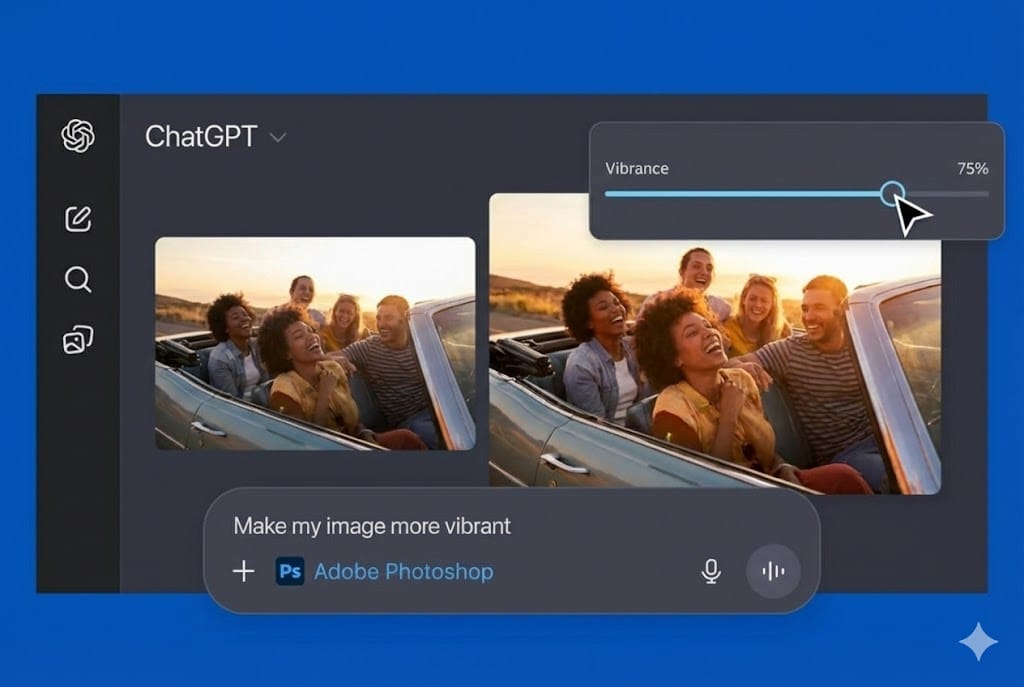
OpenAI is integrating ChatGPT directly into Adobe Photoshop and Acrobat Express. Writers, marketers, and designers can now tap into AI-generated copy, summaries, and even image prompts without leaving the tools they already rely on.
Instead of toggling between apps or pasting content back and forth, users get a more fluid, contextual creative experience — faster iterations, cleaner feedback loops, and fewer bottlenecks between idea and output.
This kind of embedded AI makes the creative process faster and more seamless. It’s also a signal that AI isn’t just powering standalone apps anymore, but it’s becoming part of the everyday software stack.
We talked about Stitch just a couple of days ago — and guess what? It can now generate full HTML/CSS components from scanned or photographed wireframes.
You can now upload a quick sketch or a UI screenshot and get back clean, editable front‑end code. And if you drop in an image, Stitch can pull a full design theme from it — colors, typography, and styling that you can apply directly to your layout.
For developers and designers, this means faster prototyping, less back-and-forth on layout fidelity, and quicker time from whiteboard to build.
Microsoft’s new research reveals how its Gigatime AI model helped compress a multi-week drug discovery process into just a few hours.
In a recent study, the system was used to identify which molecules could bind to cancer-relevant proteins — a task that normally takes weeks — and produced results in a matter of hours.
The implications here go beyond pharma: it’s a blueprint for how domain experts can pair with models to test, refine, and accelerate complex work across fields like healthcare, materials science, and bioengineering.
🔥🔥 Two tools worth trying
Spline’s browser-based 3D design platform now lets you use natural language to generate and animate 3D elements. This makes 3D prototyping and visual storytelling far more accessible — especially for marketers, designers, and product folks who don’t come from a traditional 3D background. It’s a lightweight, real-time playground for interactive visual content that would’ve taken days (or entire teams) to create a few years ago.
Huwise is an AI agent builder that helps you create structured multi-agent systems that can reason, recall, and coordinate. It’s especially useful if you’re building complex internal tooling or orchestrating workflows across functions. Think of it as a system-level brain for teams that need their tools to collaborate — not just automate tasks, but adapt to changing inputs.
🔥 One workflow that makes your day easier.
Use Gemini in Zapier to automate content and marketing tasks
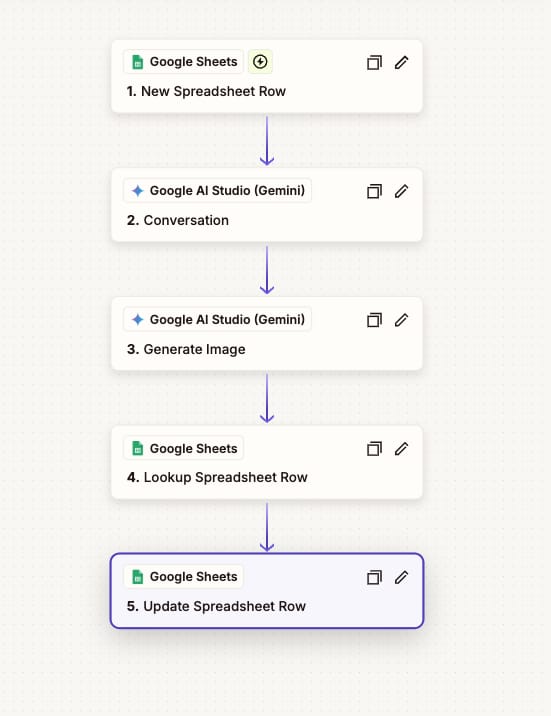
This is a plug-and-play automation that connects Google Sheets, Gemini, and Zapier to generate images and text when a new row is added to a spreadsheet. You start a Zap with a trigger like “new row in a spreadsheet,” send that data to Gemini to generate text or images based on a prompt, and then write the AI outputs back into the sheet or another app.
For example, teams can use this pattern to auto-create visuals when a row is added, summarize text, or surface insights without manual intervention — all without writing code. Gemini’s integration with Zapier lets you orchestrate these pieces in a way that fits your workflow.
Visual example below (see attached image)
Do you like this new format? |
💌 Have a system or prompt you can’t live without?
Reply to this email and share your favorite AI workflow — we’ll feature some of the best in next week’s issue.
Until next time,
Kushank @DigitalSamaritan
Reply