- Practically AI
- Posts
- 🧠 AI Video Gets Wild: Kling 3.0, Real-Time Motion, and Roblox’s Creation Engine
🧠 AI Video Gets Wild: Kling 3.0, Real-Time Motion, and Roblox’s Creation Engine
Today in AI: Kling 3.0, live motion design, and AI-powered Roblox worlds
👋 Hello hello,
You could probably make something that looks like a short film with today’s creative tools. The latest video demos feel cinematic in a way that would’ve sounded ridiculous a year ago, and motion design is starting to behave more like a live instrument than a rendering queue.
If you’ve ever wanted to experiment with video or animation but didn’t want to fight complicated software, this week feels like friction disappearing.
There’s a lot to unpack, so let’s dig in.
🔥🔥🔥 Three big updates
Up until now, most AI video tools were great for one cool shot and terrible at telling a story. Characters changed faces. Scenes didn’t match. Everything felt glued together. Kling 3.0 fixes that.
It is a new all-in-one AI video engine designed for multi-scene storytelling. It adds strong character consistency, emotional expression, and multi-shot control, letting creators build structured 15-second sequences instead of isolated clips.
It also upgrades native audio support and image generation, including 4K visuals and cinematic styling. Early demos show photorealistic scenes that look closer to film production than typical AI video experiments. Early access is live for Ultra subscribers on the web.
Roblox announced Cube, a foundation model designed to accelerate creation on its platform. The goal is to help developers generate assets and interactive experiences more efficiently.
Cube sits inside Roblox’s ecosystem, where millions of creators already build virtual worlds. By embedding AI into the creation pipeline, Roblox is betting on faster iteration and broader participation.
Why this matters: platforms are shifting from hosting content to actively helping create it. For anyone interested in game design or virtual environments, this signals a deeper integration of AI into mainstream creative workflows.
Higgsfield’s Vibe-Motion is the first AI motion design system with full real-time control. A single prompt generates motion graphics, and creators can adjust parameters live on canvas.
Normally, AI animation is a cycle of: prompt → wait → hope it worked. Vibe-Motion skips the waiting. You generate motion once, then refine it in real time on the canvas. For anyone who’s touched After Effects or tried animating social content, this feels like a shortcut to experimentation.
Instead of waiting for renders, designers refine animation interactively. That makes motion design feel closer to playing with a creative instrument than issuing one-off commands.
Real-time feedback changes how people experiment. It lowers friction for iteration and makes motion design accessible to creators who don’t specialize in traditional animation tools.
🔥🔥 Two Tools Worth Trying
PaperBanana is basically what happens when Google decides researchers shouldn’t have to suffer through diagram design anymore. It’s a research tool from Google that generates publication-ready academic illustrations from written methodology. A team of coordinated AI agents finds reference diagrams, plans structure, styles layouts, generates images, and critiques the result.
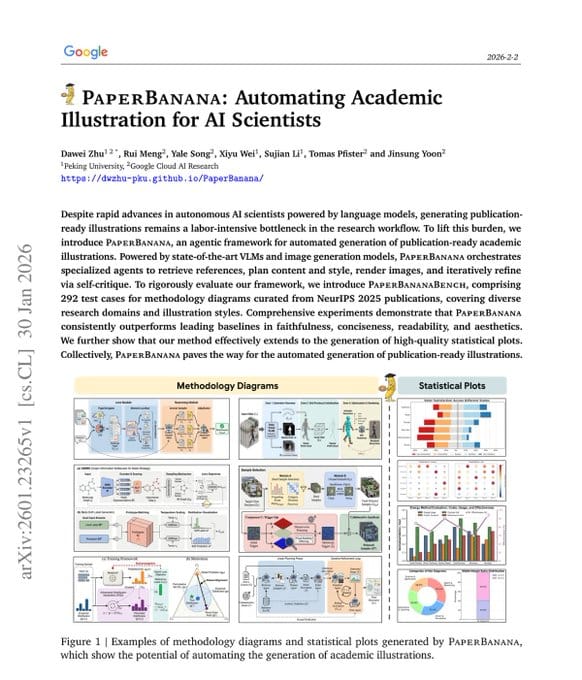
It eliminates the need for manual design in tools like Figma and enables researchers to visually document complex ideas. Human reviewers preferred its outputs 75% of the time in blind evaluations.
Even if you’re not publishing academic papers, the bigger idea is interesting: AI is learning to explain complex systems visually. If you’ve ever tried to sketch a workflow for a presentation or a proposal and ended up with a messy slide, this is the direction tools are heading.
Decart’s Lucy 2.0 generates clothing directly into live video, rather than static poses. As you move, the garment updates frame by frame in real time.
This makes online shopping more interactive by showing fit and motion instantly. It narrows the gap between digital try-on and in-store experience. Best for ecommerce teams and creators exploring AI-driven retail experiences. Take a look here.
🔥🔥 Things You Didn’t Know You Can Do With AI
You can use Claude and Sora together to create short ad-style videos from a single image.
Here’s how:
1. Upload a product photo to Claude and ask it to brainstorm a 10-second storytelling ad concept.
2. Request that Claude convert the idea into a detailed video prompt.
3. Copy that prompt into Sora to generate the skit video.
4. Iterate on the concept until the pacing and tone feel right.
5. Export and share your finished micro-ad.
Here are my results
Here’s the prompt I used in Claude:
Can we create an ad concept for a Labubu doll? The goal is to create a storytelling video with a human avatar and all. The goal is to create a really fun and creative concept for a 10s video and create a prompt for creating that video in Sora 2.
Did you learn something new? |
💬 Quick poll: What’s one AI tool or workflow you use every week that most people would find super helpful?
Until next time,
Kushank @DigitalSamaritan
Reply