- Practically AI
- Posts
- 🧠 AI is becoming everyday infrastructure
🧠 AI is becoming everyday infrastructure
Today in AI: Clawdbot workflows people actually use, frontier models level up, and prompts worth stealing
👋 Hello hello,
Happy Friday, everyone! This week felt like a small turning point in how we work with AI. The models didn’t just get “better” in abstract benchmark ways. They got more autonomous, more collaborative, and more practical for everyday work.
And if you blinked, you probably missed half of it. So let’s slow it down and translate what actually matters for you.
🔥🔥🔥 Three big updates
Anthropic just upgraded its flagship model to Claude Opus 4.6, and the headline isn’t just higher intelligence. It’s endurance. The model is designed to plan longer, sustain complex agent-style tasks, and reliably operate inside massive codebases while catching its own mistakes.
The most interesting part is the engineering experiment Anthropic shared. They tasked Opus 4.6 with building a C compiler using agent teams and mostly stepped away. Two weeks later, it worked on the Linux kernel. That’s less about one compiler and more about a glimpse into semi-autonomous software development.
Opus 4.6 also introduces a 1M token context window in beta and new integrations across Excel, PowerPoint, Claude Code, and the API. The direction is clear: longer memory, deeper reasoning, and tools that plug directly into real workflows.
Perplexity introduced Model Council, a feature that runs your question through three frontier models at the same time and then synthesizes the results. You get side-by-side outputs plus a summary highlighting where the models agree, disagree, and what each uniquely contributes.
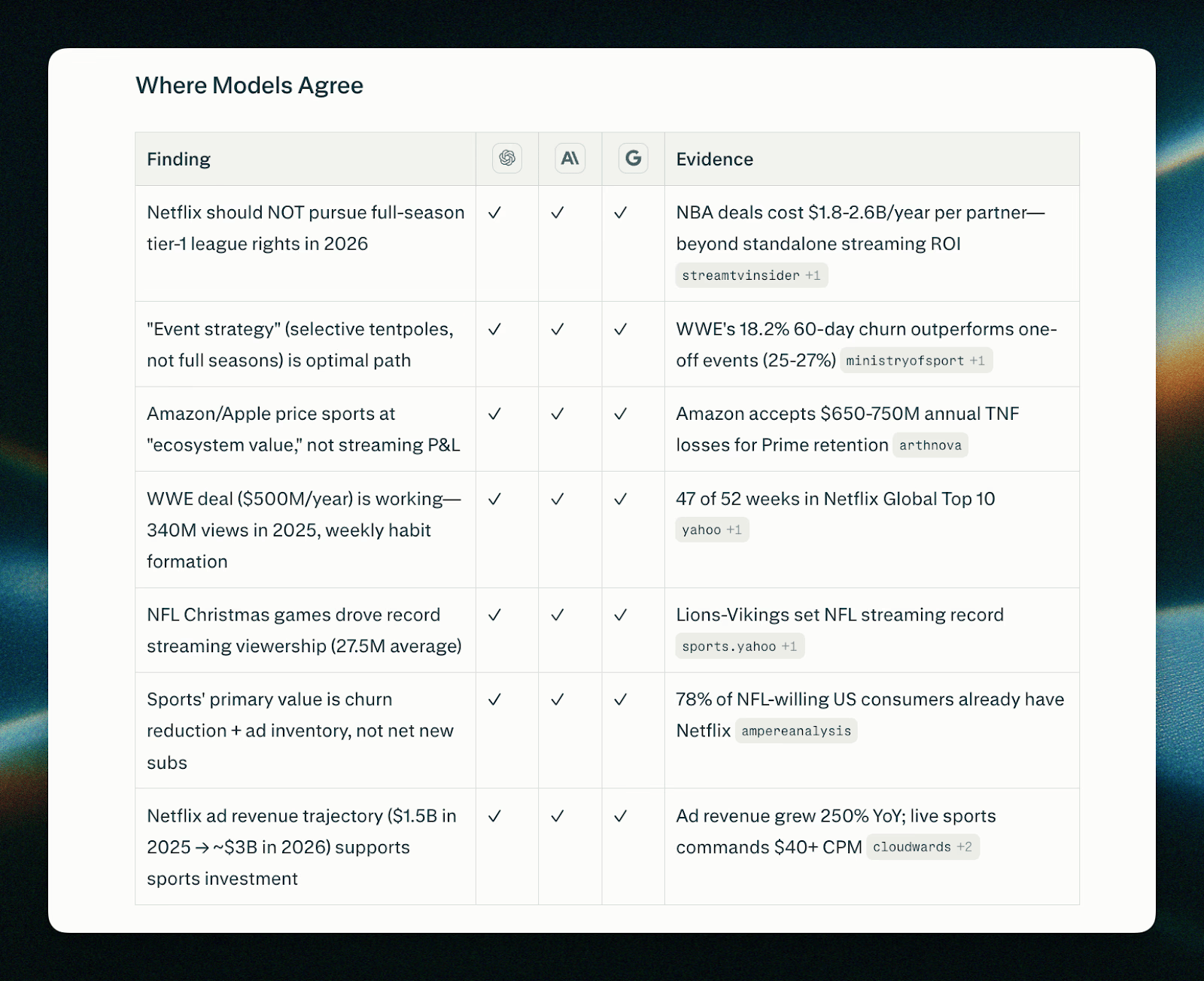
This is essentially built-in AI cross-checking. Instead of trusting a single answer, you’re seeing a structured comparison that increases confidence and transparency. For research-heavy work, that’s a big deal.
Model Council is currently available on the web for Perplexity Max subscribers. It signals a shift from “which model should I use?” to “why not use several and compare?”
OpenAI announced GPT-5.3-Codex with a strong focus on coding benchmarks and practical speed. It delivers top-tier performance on coding evaluations while using less than half the tokens of its predecessor for the same tasks and running over 25% faster per token.
The model also adds mid-task steerability and live updates during tasks, which means you can guide it while it’s working instead of restarting from scratch. Combined with improved computer use, it’s designed for more interactive, iterative development.
For developers, this is about tighter feedback loops and lower friction when building or debugging software.
🔥🔥 Two Mega Prompts
This viral prompt creates deeply structured SEO content briefs by analyzing top-ranking pages, search intent, keyword structure, and content gaps. It walks through SERP analysis, outline creation, optimization strategy, and success metrics in a single workflow.
It’s best for content marketers and founders who want agency-level briefs without expensive tools. Instead of guessing what to write, you get a roadmap built from competitive analysis. Access the full prompt here.
2. 📸 Ultra-Realistic Image Prompt Pack
These prompts generate highly realistic smartphone selfies and macro eye photography with detailed skin texture and natural lighting. The prompts explicitly avoid smoothing and beauty filters, aiming for editorial-style realism.
Here’s the image Nano Banana and the detailed prompt:
Create an ultra-realistic smartphone mirror selfie of a woman late 20s–early 30s, indoor near a window, daytime. Close-up framing of the collarbone to the top of the head. Phone partially covering face, slight downward gaze, calm neutral expression. Natural tied-back dark hair with flyaways, light grey cotton hoodie with clear fabric texture separation, and small silver earrings. Skin realism focus: visible pores, fine micro-texture, organic acne marks (non-repeating), uneven pigmentation, subtle redness, natural oil sheen only on high points. No symmetry correction. Real daylight with slight warmth, accurate white balance, and natural contrast. True-to-life colors. Phone-camera realism, subtle sensor grain, slight edge softness. No retouching, no smoothing, no beauty filters. Negatives: AI glow, plastic skin, skincare-ad look, cinematic lighting, studio light, pastel or faded colors, flat lighting, cartoon/3D style, logos or text.

Here’s an even cooler AI-generated image + prompt:
Extreme close-up of a human eye and surrounding skin, ultra-realistic macro photography. Visible fine lines, pores, natural skin sheen, subtle under-eye texture. Soft diffused lighting, realistic shadows, high dynamic range. Editorial beauty photography, no airbrushing, hyper-detailed skin realism.

It’s useful for creators experimenting with photorealistic generation, product mockups, or studying how prompt specificity affects visual output.
🔥🔥 Things You Didn’t Know You Can Do With AI
A few days ago, I spoke to you about Clawdbot — the AI agent that executes your tasks for you. A digital operator that can monitor, fetch, clean, summarize, and act without constant supervision.
Here are some really cool things people like yourself have been using Clawdbot for:
📰 Automated research and content curation
Some users have Clawdbot scanning sources like Hacker News, GitHub, and AI blogs, filtering the noise, and posting the best resources directly to their websites. Instead of doom-scrolling feeds, they wake up to a curated list of high-signal updates.
🛒 Conversion optimization for e-commerce
One founder wired Clawdbot into their e-commerce testing pipeline to continuously analyze performance and suggest CRO experiments. In under a month, they reduced their cost per acquisition dramatically and are projecting a major revenue impact just from rapid testing cycles.
📧 Personal admin on autopilot
Others are running Clawdbot on a dedicated machine to handle everyday digital chores. It cleans up email and WhatsApp inboxes, drafts responses, fetches missing receipts from purchases, and even runs monthly accounting tasks. It’s like delegating your back office to software.
🏠 Smart home monitoring and system checks
Some setups connect Clawdbot to home automation systems. It runs periodic sanity checks, monitors usage patterns, and flags anomalies before they become problems.
📺 Intelligent YouTube tracking
With access to YouTube transcripts, Clawdbot can track favorite channels, extract key insights, and send scheduled digests of interesting moments. Instead of watching hours of video, users get distilled highlights. It turns passive content into actionable summaries.
There’s so much more you can do with this tool. Check out some more cool use cases here.
Did you learn something new? |
💬 Quick poll: What’s one AI tool or workflow you use every week that most people would find super helpful?
Until next time,
Kushank @DigitalSamaritan
Reply